


Islamic Ringtones 2026
4.572.00 Reviews
App Specs
- Version
- 28.0
- Updated On
- License
- Free
- Downloads
- 1,000,000+
- Developer
- KellyApps
- Categories
- Libraries & Demo
- Platform
- Android
Screenshots

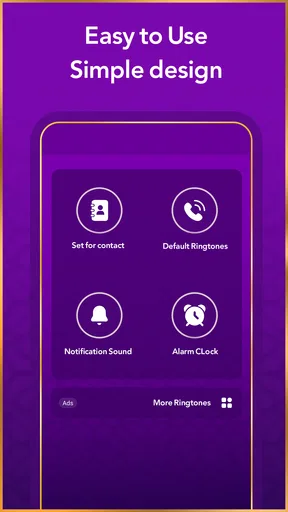

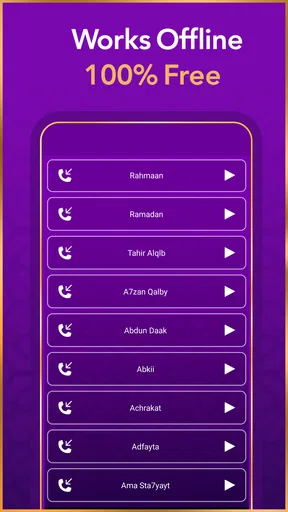

 Analysis by AppCompare
I usually judge a ringtone app by what happens after the first few days: do I still want to hear its sounds, and is it easy enough to keep the ones I like in regular use? Islamic Ringtones 2026 is aimed at people who want Islamic audio as part of their phone’s everyday sound, rather than another general-purpose collection of alerts. The idea is appealing, but the lasting value depends on choosing tones that suit the way you actually use your phone.
What the first week is good for
At first, browsing a collection of nasheeds and other Islamic sounds can feel like a welcome change from the same default alerts. I’d treat the first session as a listening pass, not a commitment to replace every sound on the phone. Preview a few options, notice which ones remain pleasant after repeated listens, and save only the strongest candidates if the app’s available controls allow it.
That distinction matters because a sound that feels moving in a quiet moment may be too prominent for a busy workplace, public transport, or a shared room. I’d test a possible ringtone at a modest volume before using it as a frequent call alert. A gentle choice may work better for everyday notifications, while a more distinctive sound can be reserved for calls that need to stand out.
From novelty to a useful habit
The app’s appeal is most durable when its sounds have a clear purpose. For example, someone might choose a restrained alert for ordinary messages and a more recognizable tone for family calls. If you prefer a spiritual audio cue when you wake, an alarm sound can make sense too, but I’d avoid using a favorite nasheed for every alert. Familiarity can turn a meaningful sound into background noise surprisingly quickly.
A practical routine is to make one or two changes, live with them for several days, then decide whether they still feel right. This is more useful than constantly switching tones just because there are more options to explore. The app belongs to the sound-customization side of the Libraries & Demo category, so its value is less about a daily stream of new tasks and more about whether the audio you select continues to fit your habits.
Who will get the most from it
I can see this being a good fit for someone who wants Islamic sounds close at hand and enjoys choosing a personal tone rather than sticking with the phone’s standard alerts. It may also suit a user looking for a small, focused way to make incoming calls feel more reflective. The app is free, rated for Everyone, and developed by KellyApps; it has an average rating of 4.5 from around 46,000 ratings and over a million installs.
On the other hand, if you want a full music player, a carefully curated devotional library, or extensive audio-editing controls, a ringtone-focused app may not meet that need. A general audio player is a better fit for listening sessions, while the phone’s built-in sound settings may be enough if you only want to assign a file you already own. I’d choose this app for browsing Islamic ringtone options, not as a replacement for those tools.
Worth Reading Before You Choose

Switching to Android Auto Means Rethinking Your Driving Routine

Google Calendar Makes a Crowded Week Easier to Manage

Baby Panda World Brings Quick Play to Modern Phones, but Its Game Library Feels Busy

ESPN’s Live Game View Makes Following Close Games Easier

QuizzLand Review: A Good Fit for Short Trivia Breaks, Not Every Player

Basketball Stars: Multiplayer Is Fast, but Can It Recover When Matches Go Wrong?
Exploring the Features
The moment you open the Islamic Ringtones 2026 app, you’re greeted with a beautifully designed interface. It’s clean, easy to navigate, and genuinely user-friendly. I didn’t have to fiddle around to find what I needed. The app offers a vast collection of Islamic ringtones, from traditional Nasheeds to contemporary tones that resonate with modern sensibilities.
The selection is impressive, and I was pleased to see a wide variety of categories. Whether you’re looking for something to remind you of prayer times or just a gentle melody to start your day, this app has it all. They’ve got everything from classic Adhan sounds to more unique tunes that blend traditional and modern elements.
Choosing tones without tiring of them
The key trade-off with ringtone collections is variety versus selectiveness. Lots of choices are useful only if you can quickly narrow them down to sounds you’ll genuinely keep. I’d compare a few previews at the same listening volume and in the same quiet setting; otherwise, a louder clip can seem more appealing simply because it is louder. Before settling on a tone, listen through its beginning and ending, since a sound that starts abruptly or feels too long may become irritating when calls arrive repeatedly.
There is also a useful distinction between a sound that works as a ringtone and one that works as a notification. Calls are occasional and need to be noticed, while short alerts may repeat throughout the day. A calm, low-key choice is less likely to interrupt a conversation or meeting. If the app’s collection includes a clip you particularly like, I’d think carefully about where it belongs before assigning it broadly.
Customization Options Galore
One of my favorite features is the customization option. You can set different ringtones for different contacts, alarms, and notifications. This level of personalization is fantastic, as it allows you to tailor your phone’s sounds to suit your mood and needs. Plus, the app allows you to preview each ringtone before downloading, which is a neat little feature that saves time and ensures you get exactly what you want.
Another cool aspect is the ability to create playlists. Imagine having a playlist of your favorite Islamic ringtones that you can switch between whenever you feel like it. The app makes it super easy to organize and access your preferred sounds.
In everyday use, I’d keep contact-specific choices limited to people whose calls I need to recognize quickly. That gives the customization a practical purpose instead of creating a long list of assignments that becomes hard to maintain. For alarms, I’d test whether a tone feels appropriate early in the morning before making it part of a routine. A sound that is lovely once may not be the one I want to wake up to every day.
Performance and Accessibility
In terms of performance, the app runs smoothly. I didn’t encounter any lags or crashes, which is always a relief. The download and installation process was straightforward, and the app doesn’t take up much space on your device, which is a huge plus for those of us perpetually battling storage issues.
The developers have also ensured that the app is accessible to a broad audience. It supports multiple languages, making it easier for users around the world to enjoy the features it has to offer. This inclusivity is something I really appreciate, as it opens the app up to a wider community.
Keeping the setup manageable
Once you have chosen your tones, there is little reason to spend time reorganizing them every day. I’d use a small set of dependable sounds and revisit the collection only when one stops feeling suitable. That approach keeps the app from becoming another source of phone-maintenance chores. If you change devices or reset your sound settings, it is also sensible to check your assignments afterward rather than assuming every choice carried over.
For someone setting this up on a family member’s phone, I’d first ask what they want to hear and where they use the phone most. A ringtone that feels meaningful to one person might be too loud or distracting for another. The ability to personalize is helpful, but it works best when each choice reflects the owner’s routine rather than someone else’s idea of a good sound.
How it compares with familiar alternatives
Compared with relying on the phone’s built-in tones, this app is for people who specifically want Islamic audio choices rather than a generic set of beeps and melodies. Compared with a full music or devotional app, its role is narrower: choosing sounds for calls and alerts is different from browsing albums or listening at length. That focus is a strength if you want a ringtone quickly, but a limitation if you expect a broader listening experience.
It is also worth separating a ringtone from a prayer-time reminder. A sound assigned to an alarm or notification can be part of a personal routine, but that does not automatically make the app a dedicated prayer schedule tool. If accurate timing and reminders are your main need, I’d look for an app designed specifically for that purpose and use ringtone customization as a separate choice.
Where friction can appear
The biggest risk is not technical complexity so much as overuse. A favorite clip can lose its effect if it plays for calls, messages, and alarms alike. I’d avoid assigning the same sound to every category, and I’d keep a neutral option available for settings where a distinctive ringtone could draw unwanted attention. That small bit of restraint makes the meaningful choices feel more deliberate.
Another consideration is personal taste. Islamic audio covers different styles, and no single collection will suit everyone’s preferences. Previewing before choosing is therefore more valuable than selecting a sound based only on its label. If you are particular about recitation, vocal style, or the exact material you want to hear, take time to listen closely and be ready to use a different source if the available choices do not fit.
Why You Should Try It
If you’re on the hunt for a ringtone app that aligns with your spiritual values while also offering a fantastic user experience, Islamic Ringtones 2026 is worth checking out. It’s not just about having a nice ringtone—it’s about creating an atmosphere of peace and mindfulness every time your phone rings.
Plus, with regular updates and the promise of new ringtones being added, you’ll always have something fresh to explore. It’s like having a little piece of tranquility in your pocket, and who wouldn’t want that?
So, if you’re ready to transform the way you experience incoming calls and notifications, give this app a shot. It’s a small change that could make a big difference in your daily routine. Download it, explore the vast library, and let the harmonious sounds bring a touch of serenity to your life.
My long-term verdict
After the novelty fades, I think the app earns space on a phone only if you find a few tones you genuinely enjoy hearing again and again. Its strongest case is straightforward: browse Islamic sounds, preview them, and use suitable choices to personalize calls or alerts. The current version is 28.0, and it is listed for devices running Android 8.0 or later, so compatibility is worth checking before you build a routine around it.
For an ordinary day, I’d choose one calm notification sound and a distinct but not jarring ringtone, then leave them in place for a week. If they still feel comfortable during work, errands, and quiet time at home, the setup is doing its job. If I find myself silencing the phone or changing the sound constantly, that is a sign to simplify rather than keep browsing for novelty.
Overall, I’d recommend it to someone who wants Islamic ringtone choices and is happy to curate a small personal set. I would skip it if my priority were a reliable prayer timetable, a comprehensive listening library, or advanced control over audio. Used for its focused purpose, it can add a personal touch without demanding much ongoing attention; its lasting value comes from thoughtful selection, not from changing tones every day.
Pros
- Wide variety of ringtones available.
- Easy to navigate interface.
- High-quality sound clips.
- Regular updates with new content.
- Offline access after download.
Cons
- Contains ads that can be intrusive.
- Limited customization options.
- Requires internet for initial download.
- Some ringtones are quite similar.
- No option to create custom ringtones.
FAQs for Islamic Ringtones 2026
What features does the Islamic Ringtones 2026 app offer?
Islamic Ringtones 2026 provides a wide variety of high-quality Islamic ringtones, including Nasheeds, Quranic verses, and traditional Islamic melodies. Users can easily set these as their ringtone, notification sound, or alarm. The app also features a user-friendly interface, allowing for easy navigation and customization options.
Is the Islamic Ringtones 2026 app free to download and use?
The Islamic Ringtones 2026 app is free to download. However, it may include in-app purchases or ads that help support the developers. Users can enjoy a broad selection of ringtones at no cost, but premium features or ad-free experiences might require a purchase.
How frequently is the content on Islamic Ringtones 2026 updated?
The app developers regularly update Islamic Ringtones 2026 to include new ringtones and improve functionality. Updates often coincide with religious holidays or significant Islamic events, ensuring users have access to the latest and most relevant content. Checking for updates in your app store is recommended to keep the app current.
Can I use Islamic Ringtones 2026 on both Android and iOS devices?
Yes, Islamic Ringtones 2026 is available for both Android and iOS platforms. Users can download it from the Google Play Store for Android devices and the Apple App Store for iOS devices. Make sure your device meets the app’s compatibility requirements to ensure smooth operation.
Does the app require an internet connection to function?
Islamic Ringtones 2026 does not require an internet connection to play or set ringtones once downloaded. However, an internet connection may be necessary for initial download, updates, or accessing any online features. It's designed to work efficiently whether you're online or offline after installation.


